> ## Documentation Index
> Fetch the complete documentation index at: https://docs.potpie.ai/llms.txt
> Use this file to discover all available pages before exploring further.
# Build a Feature
> **Potpie's code generation interface**
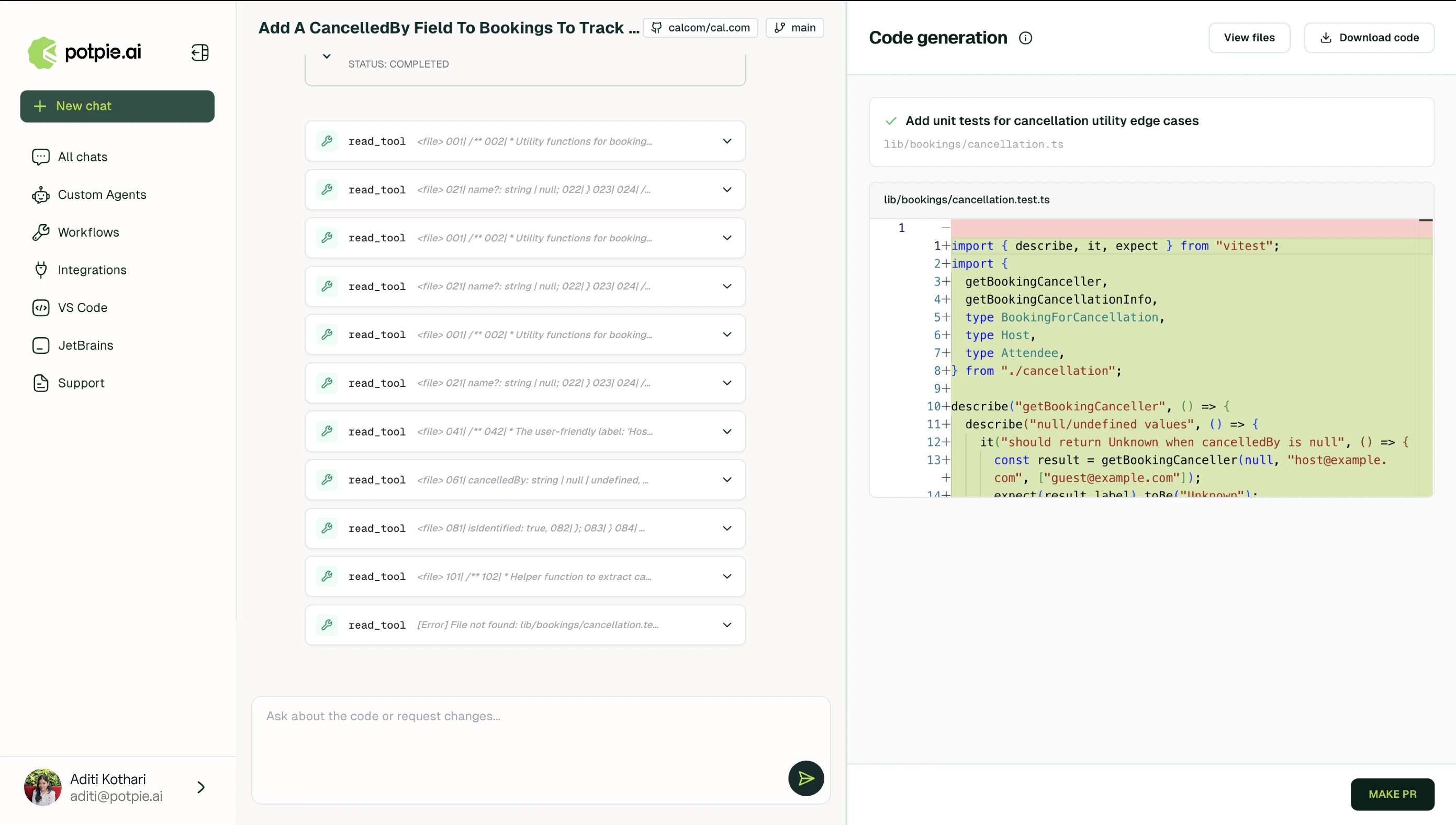 Potpie reads existing patterns, conventions, and dependencies from the [knowledge graph](/concepts/knowledge-graph) before initiating a line of code.
It maps the request against what already exists, generates a **specification** and architecture plan, and presents every change as a reviewable **diff**. The code it produces fits naturally into what already exists.
See [Make Code Changes](/tutorials/make-code-changes) for a complete walkthrough from writing code to opening a pull request.
## How It Works
Build starts by probing **clarifying questions** to lock-in the scope to generate a **specification** covering every file that needs to be created or modified.
During exploration, it reads files directly by path with optional line ranges, reads multiple files simultaneously when working across related modules, and performs **grep-style content searches** to identify naming conventions, import patterns, and existing usage across the codebase.
It then produces a **plan** showing what changes, in what order, and how new components relate to existing ones. Code is presented as a **diff** for every file touched.
Based upon the complexity of what's being built, Potpie automatically determines whether a **single agent** can handle the full task or whether **specialized subagents** should split the research and coding work.
## What It Produces
Every change is shown as a diff. Once approved, Potpie creates the **pull request**.
Nothing is generated speculatively. If a referenced file cannot be located in the codebase, Build is instructed to request clarification rather than fabricate code or assumptions that do not exist.
## Example uses
Adding a new endpoint with full dependency awareness and matching code style.
Updating authentication middleware across all protected routes.
Potpie reads existing patterns, conventions, and dependencies from the [knowledge graph](/concepts/knowledge-graph) before initiating a line of code.
It maps the request against what already exists, generates a **specification** and architecture plan, and presents every change as a reviewable **diff**. The code it produces fits naturally into what already exists.
See [Make Code Changes](/tutorials/make-code-changes) for a complete walkthrough from writing code to opening a pull request.
## How It Works
Build starts by probing **clarifying questions** to lock-in the scope to generate a **specification** covering every file that needs to be created or modified.
During exploration, it reads files directly by path with optional line ranges, reads multiple files simultaneously when working across related modules, and performs **grep-style content searches** to identify naming conventions, import patterns, and existing usage across the codebase.
It then produces a **plan** showing what changes, in what order, and how new components relate to existing ones. Code is presented as a **diff** for every file touched.
Based upon the complexity of what's being built, Potpie automatically determines whether a **single agent** can handle the full task or whether **specialized subagents** should split the research and coding work.
## What It Produces
Every change is shown as a diff. Once approved, Potpie creates the **pull request**.
Nothing is generated speculatively. If a referenced file cannot be located in the codebase, Build is instructed to request clarification rather than fabricate code or assumptions that do not exist.
## Example uses
Adding a new endpoint with full dependency awareness and matching code style.
Updating authentication middleware across all protected routes.